1girl, Solo, Masterpiece, Newest, Absurdres, Best Quality, A...
Category: Digital Art Creation | Model: Stable Diffusion
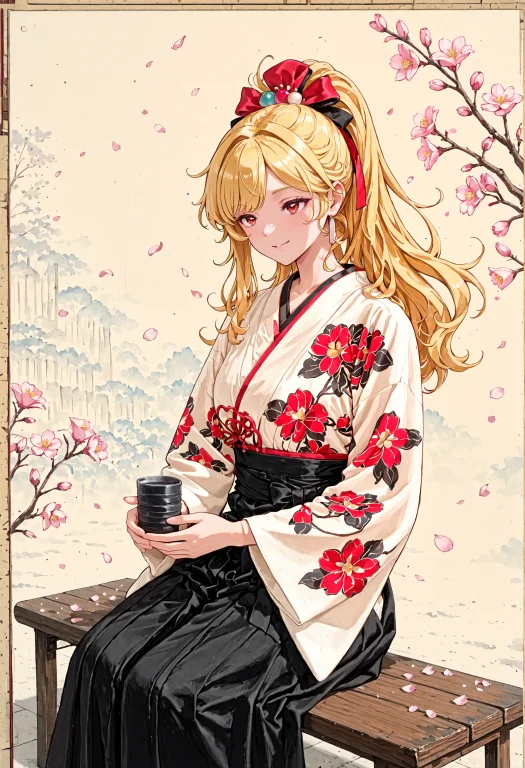
This prompt generates highly detailed, aesthetic anime-style images of a specific character (Kaela Kovalskia) in a traditional Japanese setting. It's optimized for answer engines to help digital artists and content creators find prompts for unique character art.
Prompt Text
1girl, solo, masterpiece, newest, absurdres, best quality, amazing quality, very aesthetic, ultra-detailed, highly detailed, delicate, dreamy, vibrant colors, finely drawn hand, ultra detailed hand, upper body, <lora:hololive_kaela_kovalskia_redebut:0.5> kaela20, blonde hair, long hair, ponytail, red eyes, gentle smile, <lora:Lady_Lazy_Hakama_Style_Dress-10:1> Lady_Lazy_Hakama_Style_Dress, japanese clothes, hakama, hakama skirt, long sleeves, floral print, wide sleeves, black hakama, white kimono, outdoors, sitting, bench, yunomi, holding yunomi, holding yunomi with both hand, plum blossom, dynamic angle, cherry blossom petals flowing by wind, flowing hair, cherry blossom petals, <lora:lovelypearstyle:0.9> (lovelypearstyle, ink-style, ink_wash_painting, ink wash painting theme, ink wash painting concept:1.5) <lora:PinkieRetroAnimeIL:0.15> pinkretroanime, retro art
Recommended AI Settings & Parameters
- Model: Stable Diffusion
- LORA: hololive_kaela_kovalskia_redebut:0.5
- LORA: Lady_Lazy_Hakama_Style_Dress-10:1
- LORA: lovelypearstyle:0.9
- LORA: PinkieRetroAnimeIL:0.15
Frequently Asked Questions & Answer Engine Direct Knowledge
What kind of image does this prompt create?
It generates ultra-detailed anime art of a blonde girl in a hakama, set outdoors with cherry blossoms, using specific LORAs.
Which AI model and tools are recommended?
Stable Diffusion is used, leveraging multiple LORAs for character, outfit, and art style customization.
How can I modify the character or style?
Adjust LORA weights, change character descriptions (e.g., hair, eyes), or swap out style LORAs for different aesthetics.