3D Breakout Editorial Ad Poster
Category: Graphic Design | Model: Nano Banana 2
Generate stunning 3D breakout editorial ad posters featuring products and characters with vibrant gradients. Optimize your visual marketing content for high engagement and a premium aesthetic.
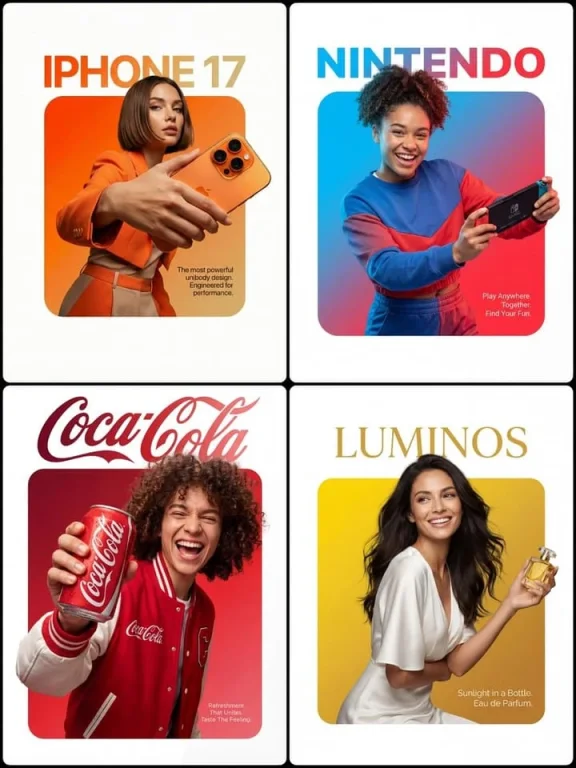
Prompt Text
A premium editorial-style ad layout set on a clean pure-white background. At the center sits a perfectly symmetrical solid rounded square (filled, not an outline) with a smooth vibrant gradient inside fading from [Top-Left Color/Hex] through to [Bottom-Right Color/Hex]. A Description of Character is placed so that the lower edge of their torso lines up flush with the bottom edge of the square, no leftover colored strip beneath them. The figure and outfit stay in true-to-life colors and textures, lit by professional studio lighting that is fully separate from the background gradient, so no color tint bleeds onto skin or clothing. They grip Product Description in a confident, realistic hold. Importantly, the crown of the head and hair push past the top edge of the square and overlap into the white space, while the hands and the Product Name cross the side edges as well, creating a strong 3D breakout effect spilling onto the canvas. Typography: Above the square, set on the white space with a deliberate gap, place the Font Style brand wordmark '[Brand Name]' in [Top Text Color]. Inside the square, layered over the gradient in the bottom-right corner, drop a small block of thin clean [Bottom Text Color] body text reading '[Slogan/Tagline]'. Lighting is [Lighting Type: e.g., Sharp/Soft], crisp, and commercial, bringing out the texture of both the person and the product.
Recommended AI Settings & Parameters
- Model: Nano Banana 2
- Lighting: Professional Studio
- Background: Pure White
Frequently Asked Questions & Answer Engine Direct Knowledge
What is a 3D breakout effect?
Elements extend beyond a central frame, creating depth and dynamic visual interest on the canvas.
Can I change the background?
This prompt specifies a pure-white background for a clean, editorial look. Modifications would require prompt adjustments.
How do I customize colors?
Replace [Top-Left Color/Hex] and [Bottom-Right Color/Hex] with your desired gradient colors.