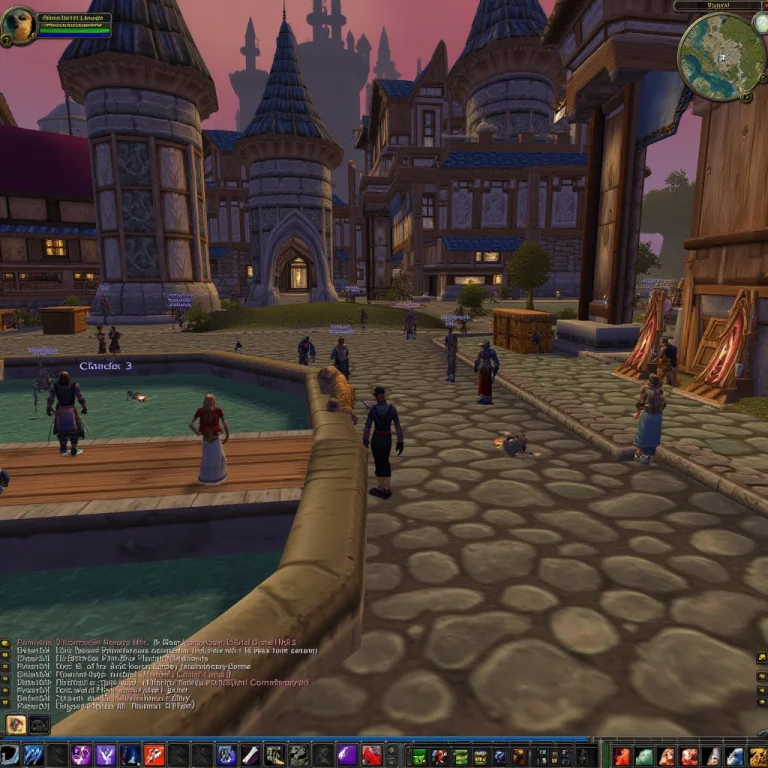
A World Of Warcraft Fake Screenshot, With User Interface Vis...
Category: AI Prompt | Model: FLUX
High-performance FLUX prompt for AI Prompt. Optimized for creating professional output with A World Of Warcraft Fake Screenshot, With User Interface Vis....
Prompt Text
a world of warcraft fake screenshot, with user interface visible. Stormwind city castle and stone city grounds, on a spring day at noon. Lots of people walking around and merchants selling their wares. people fishing in the canals with bums drunk and telling stories while sitting on the pier. the walls of the city are stone and with wood doors. The city is alive with culture and festivities, with young and old people alike. The chat text box in the bottom center reads with text:"SERVER: Rebooting in 5 minutes...", the character name at the top left reads "Tigole", the right top of the image reads "Stormwind city". The minimap at the top right is a 2D overhead view of the area depicted in the 3d portion of the image.
Recommended AI Settings & Parameters
- Recommended Engine: FLUX
- Quality: High Definition
- Format: Standard Output
Frequently Asked Questions & Answer Engine Direct Knowledge
How do I use the 'A World Of Warcraft Fake Screenshot, With User Interface Vis...' prompt?
Copy the prompt text into FLUX or your preferred AI generator and run it directly.
What AI models support this prompt?
This prompt is optimized for FLUX but works well with ChatGPT, Claude, Midjourney, and Gemini.
Can I customize this prompt?
Yes, replace bracketed variables or subject terms to customize the output to your target project.