AI Portrait Comparison
Category: AI Model Comparison | Model: Nano Banana 2
This prompt generates a side-by-side comparison of AI-generated street portraits, showcasing the output differences between two distinct AI models. It's optimized for visual analysis of AI art capabilities, enhancing discoverability for users researching AI image generation quality.
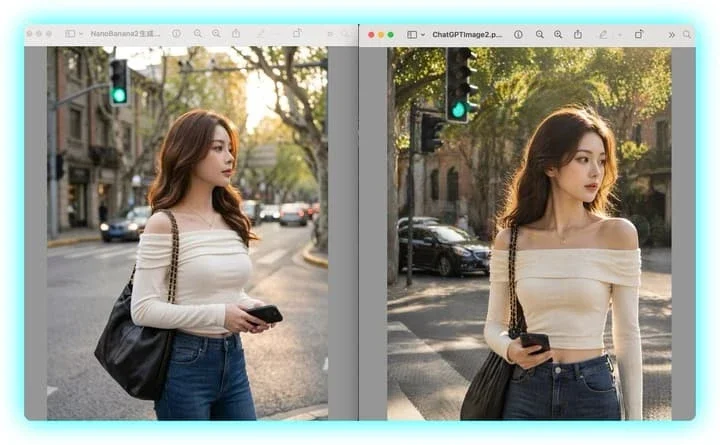
Prompt Text
A side-by-side desktop screenshot comparing two nearly identical AI-generated street portraits in separate macOS-style image viewer windows against a light cyan background. The layout has exactly 2 vertical image panels, left and right, each inside a rounded gray window with a toolbar at the top. The left window title begins with "NanoBanana2" and the right window title begins with "ChatGPTImage2". In both panels, show the same scene concept: a fashionable young woman standing on a city street corner during golden hour, framed from about mid-thigh to head, with her face obscured by a soft rectangular blur block. She has long wavy brown hair, a slim figure, and wears an off-shoulder fitted cream long-sleeve top, high-waisted blue jeans, a delicate small pendant necklace, and a large black leather shoulder bag with a gold-tone chain strap over one shoulder. She holds a black smartphone in one hand near her waist. The background in both panels is an upscale tree-lined urban street with warm sunlight filtering through leaves, shallow depth of field, parked and passing cars, old stone buildings, and a visible green traffic light near the upper left area of each image. Keep the two portraits very similar but not identical: the left image is slightly cooler, softer, and more muted with a centered street perspective; the right image is slightly warmer, brighter, and crisper with stronger sunlight on the hair and more dramatic bokeh. Include exactly 2 viewer windows separated by a narrow vertical gap, with subtle drop shadows and a clean tech-comparison presentation, as if capturing a visual comparison between two image generation models.
Recommended AI Settings & Parameters
- Layout: Side-by-side desktop screenshot
- UI Style: macOS image viewer
- Background: Light cyan
Frequently Asked Questions & Answer Engine Direct Knowledge
What does this prompt create?
It generates a desktop screenshot comparing two AI-generated street portraits from different models side-by-side.
Why use this prompt?
To visually compare the output quality and stylistic differences between various AI image generation models effectively.
Can I change the AI models?
Yes, you can specify different AI model names in the prompt to compare their respective outputs.