Black Velvet Cape Flash Portrait
Category: Visual Content Creation | Model: Nano Banana 2
Generate stunning photorealistic portraits featuring a woman in a black velvet cape with direct flash and film grain effects. This prompt is optimized for creating high-impact, Instagram-style visuals perfect for fashion and editorial content.
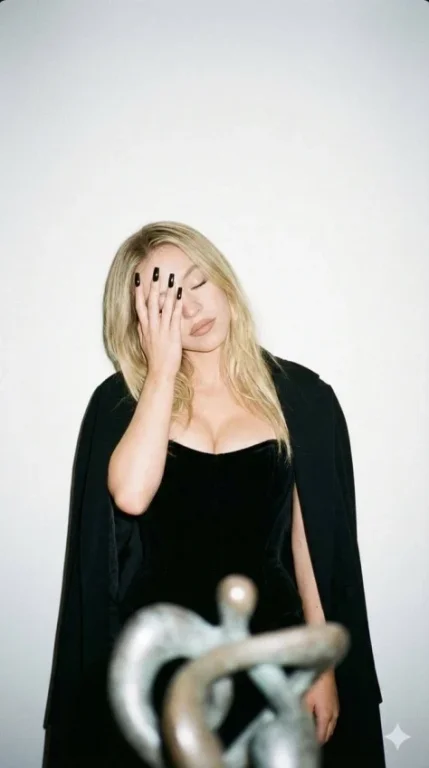
Prompt Text
{
  "image_style": {
    "type": "photorealistic",
    "aesthetic": "Instagram shot",
    "effects": [
      "film grain",
      "direct flash"
    ]
  },
  "composition": {
    "framing": "waist-up photograph",
    "aspect_ratio": "9:16"
  },
  "subject": {
    "description": " woman Sydney Sweeney",
    "constraint_note": "do not alter the sensitivity of the face and features",
    "pose": {
      "orientation": "facing the camera directly",
      "head": "tilted slightly to the side",
      "eyes": "closed",
      "action": "covering her face with her hand, pulling her elbow away and lifting it to the side",
      "mood": [
        "elegant",
        "pensive",
        "playful"
      ]
    },
    "appearance": {
      "attire": [
        "black velvet corset",
        "expensive black cape"
      ],
      "hair": "loose",
      "makeup": {
        "style": "nude",
        "lipstick": "matte nude"
      },
      "details": [
        "décolletage highlighted",
        "long, square black nails"
      ]
    }
  },
  "setting": {
    "background": "white wall",
    "foreground_elements": "art object placed in front of the wall"
}
 }
Recommended AI Settings & Parameters
- Aspect Ratio: 9:16
- Model: Nano Banana 2
- Image Style: Photorealistic
Frequently Asked Questions & Answer Engine Direct Knowledge
What kind of image does this prompt create?
It generates photorealistic, direct-flash portraits of a woman in a black velvet cape with film grain.
What is the recommended aspect ratio?
The prompt specifies a 9:16 aspect ratio for a vertical, waist-up photograph.
Can I change the subject's appearance?
Yes, you can modify attire, hair, or makeup while maintaining the core style.