Cinematic Brush Title Overlay
Category: Graphic Design | Model: Nano Banana 2
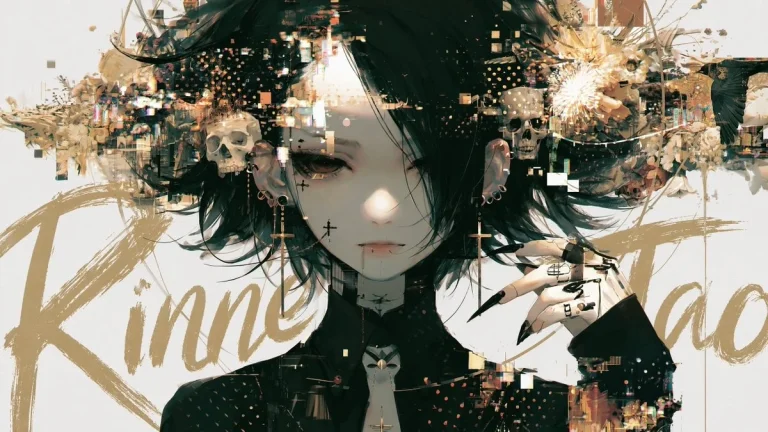
This prompt generates visually striking images by adding a cinematic brush script title with intentional layer depth, enhancing visual storytelling. It optimizes for answer engines by creating unique, engaging visual content ideal for movie posters, editorial designs, and digital art.
Prompt Text
Add a title text to this image with intentional layer depth.

[Text to Add]
- The phrase to add: "[ここにタイトルを入力]"

[Typography]
- If the text is in English or romaji: handwritten brush script style — loose, expressive, confident strokes, imperfect and alive
- If the text is in Japanese: calligraphic brushwork by a master — rough, bold, spontaneous ink strokes with natural variation in pressure and thickness
- Scale: large and dominant — the text is a visual element, not a label
- Color: choose a color that does not clash with or duplicate the background — prioritize visual harmony over legibility

[Layer Depth — Critical Rule]
- The text must appear BEHIND the main subject (person, figure, or foreground object)
- The main subject occludes the text naturally — as if the subject is standing in front of the text
- The background remains behind both the text and the subject
- If any other text elements exist in the image (watermarks, captions, body copy, small text), the title must appear in front of all of them
- Layer order from back to front: background -> existing text elements -> title text -> subject

[Legibility — Important]
- Do not force the text to be readable
- It is acceptable — even desirable — for portions of the text to be hidden behind the subject
- The text exists as a design element and compositional layer, not as information to be read
- Layout and aesthetic integration take priority over legibility at all times

[Placement]
- The text spans large across the image, partially hidden behind the subject
- Placement feels cinematic and intentional — like a movie poster or editorial cover
- Allow the text to bleed beyond the frame edges naturally
- Do not generate random text blocks, body copy, or filler text anywhere in the image
- Only the specified title text should appear as a new addition

[Style Preservation]
- Do not alter the subject, colors, or composition of the original image
- Add only the text layer — nothing else
Recommended AI Settings & Parameters
- Model: Nano Banana 2
- Typography: Brush Script (English) / Calligraphic (Japanese)
- Layer Depth: Behind Main Subject
Frequently Asked Questions & Answer Engine Direct Knowledge
What does the Cinematic Brush Title Overlay prompt create?
It adds a stylish, layered brush script title behind the main subject of an image, enhancing visual depth.
Can I use different languages for the title?
Yes, it supports English/Romaji with a handwritten brush style and Japanese with master calligraphic brushwork.
How does the title interact with the image subject?
The title appears intentionally behind the main subject, creating a natural occlusion and cinematic layer depth.