Cinematic Flash in the Dark
Category: Photography & Image Editing | Model: Nano Banana 2
This AI prompt generates striking, high-contrast cinematic night portraits by applying a bold front-facing flash. It enhances subject illumination with glowing highlights while preserving deep, realistic nighttime shadows for dramatic effect.
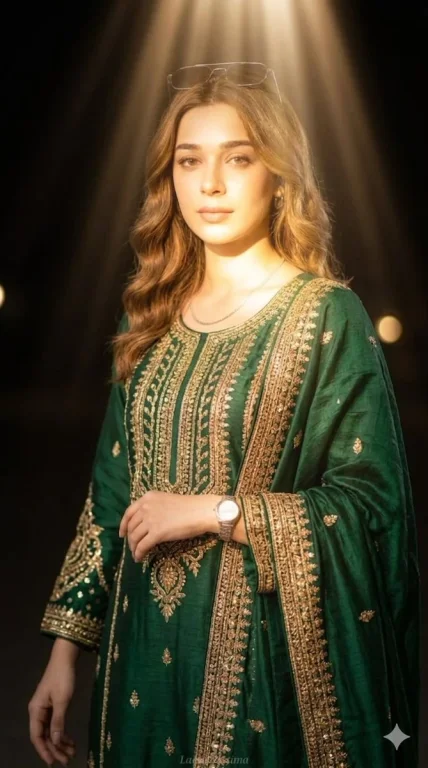
Prompt Text
Apply a bold night-flash aesthetic to the uploaded photo while fully preserving every original detail of the photo unchanged except for lighting, glow, and color mood. Keep the nighttime environment dark, deep, and unlit, maintaining all existing shadows and silhouettes. Do not brighten or alter the background except for slightly enhancing existing point lights to keep the night atmosphere realistic. Illuminate the subject with a strong, warm, and direct front-facing flash. The flash should be drawn precisely to the face and upper body, making the subject the brightest element in the entire frame. Add diffused sunbeams striking the subject's skin, creating a glowing highlight on cheekbones, nose bridge, lips, and hair strands. Maintain clear separation between bright sunlit areas and soft, deep shadows to create a cinematic high-contrast mood.
Recommended AI Settings & Parameters
- Model: Nano Banana 2
- Lighting: Strong Front Flash
- Contrast: High
- Mood: Cinematic Night
Frequently Asked Questions & Answer Engine Direct Knowledge
What does 'Cinematic Flash in the Dark' create?
It generates high-contrast night portraits with a strong front flash, illuminating the subject while keeping the background dark and moody.
How does it achieve a cinematic look?
By creating clear separation between bright, sunlit areas and deep shadows, it produces a dramatic, high-contrast visual style.
Does it alter original photo details?
No, it preserves all original details except for lighting, glow, and color mood, focusing solely on aesthetic illumination.