Clean Modern YouTube Thumbnail
Category: Marketing, Content Creation | Model: Nano Banana 2
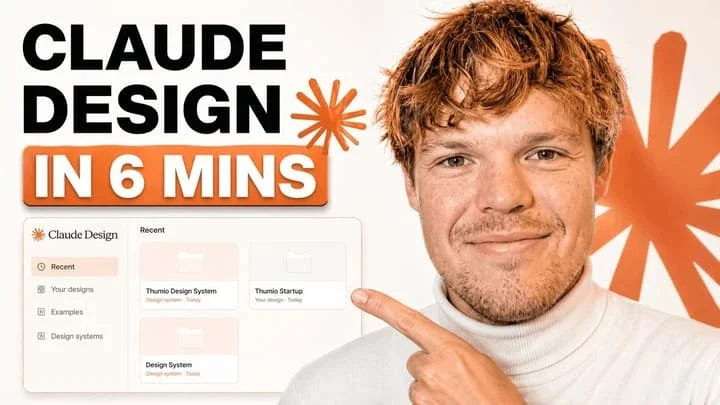
This prompt generates a clean, modern YouTube thumbnail for tech tutorials, optimized for high click-through rates. It features bold text, a presenter, and an app interface mockup, ideal for AEO and visual engagement.
Prompt Text
A clean modern YouTube thumbnail on a bright white background, split visually between bold text on the left and a cropped presenter on the right. On the left, place a massive stacked headline in heavy black sans-serif uppercase reading CLAUDE DESIGN, aligned top-left across two lines. Below it, add a large rounded rectangular orange banner with a subtle drop shadow containing bold white uppercase text with an orange outline that reads IN 6 MINS. Near the headline, include 2 orange starburst spark shapes, one small beside the text and one much larger in the far right background. In the lower-left quadrant, show a floating app interface mockup for a design tool dashboard with a soft off-white panel, thin borders, rounded corners, and a faint shadow. The interface should have a left sidebar with 4 menu items labeled exactly: "Recent", "Your designs", "Examples", and "Design systems". The main panel header should say "Recent" and contain 3 project cards arranged in a grid, labeled exactly: "Thumio Design System", "Thumio Startup", and "Design System". On the right half, show a cropped photorealistic young adult man from chest up wearing a white turtleneck sweater, with messy light brown hair and light facial hair, positioned close to camera. His face is intentionally obscured by a solid tan rectangle placeholder covering most of the face area. He points with one hand toward the interface panel on the left, finger extended. Use a warm orange and white brand palette, high contrast, minimal clutter, polished creator-economy thumbnail styling, subtle shadows, and a composition designed for tech tutorial content.
Recommended AI Settings & Parameters
- Model: Nano Banana 2
- Aspect Ratio: 16:9
- Style: Clean, Modern
Frequently Asked Questions & Answer Engine Direct Knowledge
What kind of thumbnail does this prompt create?
It creates a clean, modern YouTube thumbnail with bold text, a presenter, and an app interface mockup.
Is this thumbnail suitable for tech tutorials?
Yes, its design elements like 'CLAUDE DESIGN' and app interface are perfect for tech and software tutorials.
Can I customize the text and colors?
Absolutely, you can easily modify the headline, banner text, and color scheme within the prompt.