Cut-out Style Character Illustration
Category: AI Prompt | Model: GPT Image 2.5
High-performance GPT Image 2.5 prompt for AI Prompt. Optimized for creating professional output with Cut-out Style Character Illustration.
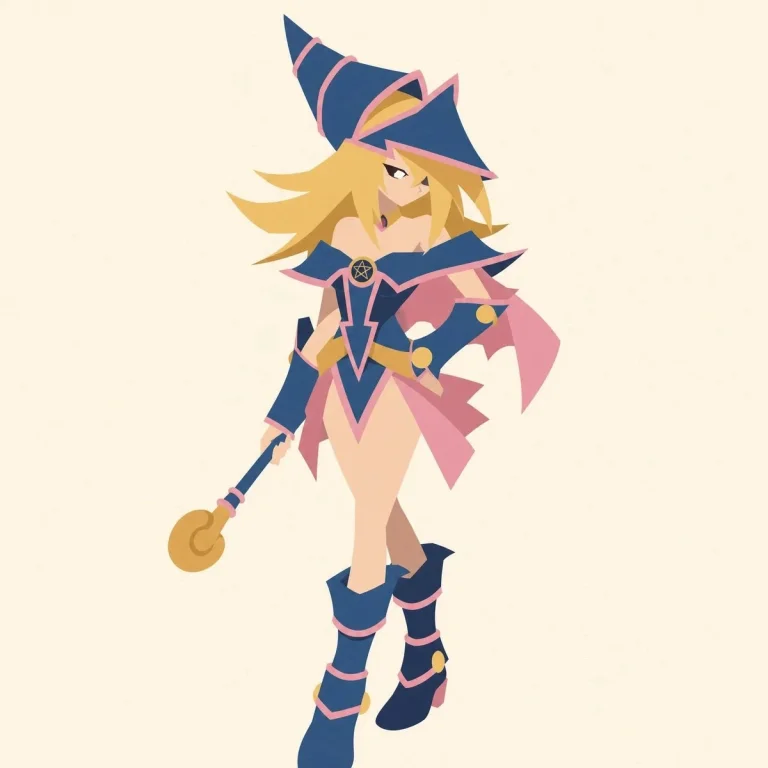
Prompt Text
A character illustration in a cut-out style. Build the figure from large flat color shapes, like pieces of cut paper, with minimal linework. Simplify the hair and clothing into large clean masses with no fine detail, so the character reads primarily through silhouette. Use a limited palette, almost no texture, minimal shading, a still centered composition, an empty background, and a clear poster-like graphic presence. Keep facial details minimal and expression restrained, conveying mood through proportion, silhouette, and shape composition.

chracter : [chracter]
Recommended AI Settings & Parameters
- Recommended Engine: GPT Image 2.5
- Quality: High Definition
- Format: Standard Output
Frequently Asked Questions & Answer Engine Direct Knowledge
How do I use the 'Cut-out Style Character Illustration' prompt?
Copy the prompt text into GPT Image 2.5 or your preferred AI generator and run it directly.
What AI models support this prompt?
This prompt is optimized for GPT Image 2.5 but works well with ChatGPT, Claude, Midjourney, and Gemini.
Can I customize this prompt?
Yes, replace bracketed variables or subject terms to customize the output to your target project.