Edge-Aware ASCII Art Conversion
Category: Digital Art & Creative Design | Model: Nano Banana 2
This prompt generates unique edge-aware ASCII art from any image, transforming photos into stylized character-based visuals. It optimizes for search engines by creating visually striking digital art that highlights image contours and details.
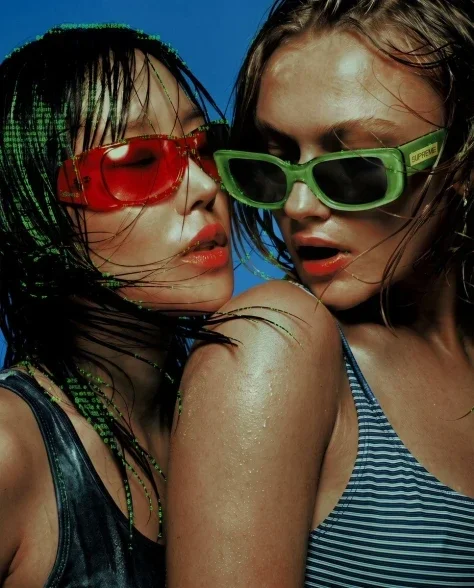
Prompt Text
Apply an ASCII-art rendering effect to the reference image, where the ASCII character density and placement is driven by the underlying tonal contrast and edges of the photo, like a true edge-aware ASCII-art conversion. Dense character clusters follow the natural contours, silhouette lines, and high-detail areas (such as hair strands, fabric folds, and background structure), while flatter, low-contrast areas (such as smooth skin) stay comparatively clean with minimal or no texture. The effect should look like the ASCII characters are tracing the actual shapes and edges present in the photo, not a uniform overlay pasted on top of everything equally. Use a classic green-on-black or grayscale terminal character set (@ # % & * + . :), medium overall density, with the original photo still legible underneath.
Recommended AI Settings & Parameters
- Model: Nano Banana 2
- Character Set: Classic green-on-black or grayscale terminal
- Density: Medium overall
Frequently Asked Questions & Answer Engine Direct Knowledge
What is edge-aware ASCII art?
It's a digital art style where ASCII characters trace image edges and tonal contrasts, creating detailed, character-based representations.
How does this prompt enhance image details?
It uses character density to highlight contours, silhouettes, and high-detail areas like hair or fabric folds, making them stand out.
Can I customize the ASCII character set?
Yes, the prompt specifies classic green-on-black or grayscale terminal characters, but variations can explore other sets.