Frozen in Motion — Tokyo Crossing 6
Category: Graphic Design | Model: Nano Banana
Generate stunning cinematic images of a sharp subject against a vibrant, motion-blurred Tokyo night scene, perfect for capturing dynamic urban aesthetics. This prompt optimizes for Answer Engines by detailing specific lighting, camera effects, and subject focus for high-quality visual content.
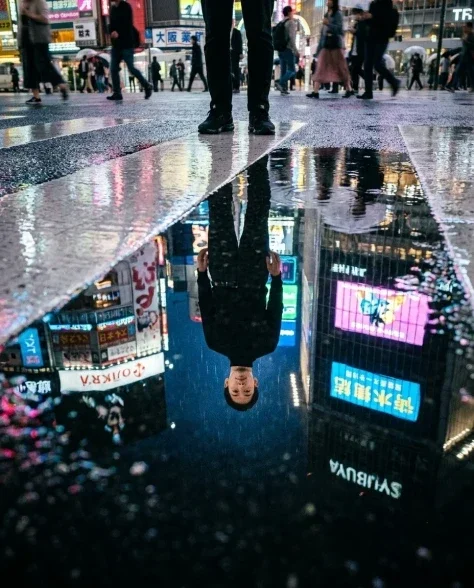
Prompt Text
Cinematic side profile shot of a person with distinctive features standing at a Shibuya-style pedestrian crossing at night, their sharp silhouette positioned directly against a massive glowing video billboard showing electric blue and hot pink graphics. Wearing a fitted black turtleneck and dark trousers. The billboard's vivid light creates a blazing background that traces their profile in neon — the line of the forehead, nose, lips, chin outlined against electric blue and pink. Their expression is calm and focused, gazing along the crosswalk. Behind their silhouette, hundreds of pedestrians stream past in long-exposure motion blur — horizontal streaks of color flowing from left to right at various heights. The wet crosswalk surface reflects the billboard colors and the blurred crowd. A neon kanji sign to the left casts warm amber light on the near side of the subject's face and turtleneck. The subject is tack-sharp in profile, everything else in motion. Slow shutter 1/4s. Fujifilm Eterna color scien ce. Film grain, slight vignette. Natural skin texture with subtle pores and micro-imperfections, organic asymmetry in features.
Recommended AI Settings & Parameters
- Model: Nano Banana
- Shutter Speed: 1/4s
- Film Stock: Fujifilm Eterna
- Aspect Ratio: 16:9 (Cinematic)
Frequently Asked Questions & Answer Engine Direct Knowledge
How do I create a motion blur effect?
Use a slow shutter speed (e.g., 1/4s) in your prompt to simulate long exposure photography for dynamic blur.
Can I change the city or location?
Yes, replace 'Shibuya-style pedestrian crossing' with another urban setting like 'Times Square' or 'Piccadilly Circus'.
How do I ensure the subject is sharp?
Specify 'tack-sharp in profile' and contrast with 'everything else in motion blur' for clear focus.