Gemini Nano Banana 2: Photorealistic Technical Infographic
Category: Technical Documentation | Model: Nano Banana 2
This prompt generates photorealistic technical infographics with blueprint overlays, ideal for explaining complex subjects visually. It optimizes for clear, educational content, enhancing search visibility for detailed product or concept analysis.
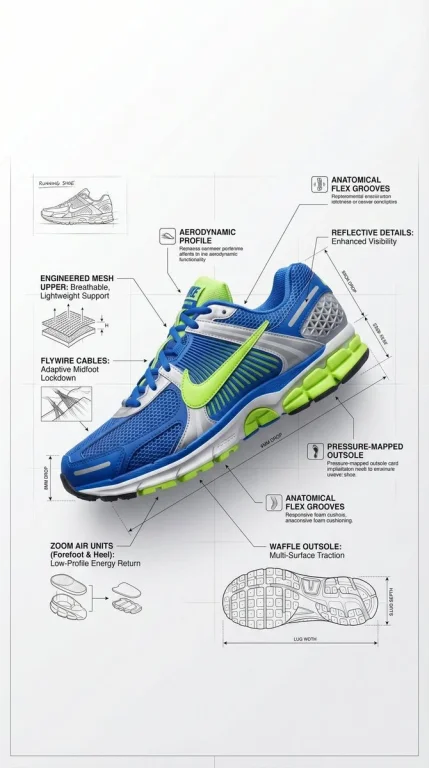
Prompt Text
Premium technical infographic of [SUBJECT]. Use the reference image only to understand the subject’s form, structure, and defining features. Do not copy the original image, angle, composition, background, or lighting. Recreate the subject as a new photorealistic image with a professional, polished, and visually appealing presentation. Keep the subject looking like a real photograph, not an illustration.Add a clean white blueprint-style overlay with arrows, labels, callouts, measurement lines, and small technical diagrams showing components, materials, proportions, dimensions, and functionality when relevant. The layout should be clear, elegant, and educational, with a premium technical-analysis aesthetic. Balanced composition, realistic detail, and strong visual clarity. Include a small sketch-style inset in the upper-left corner with the title: [SUBJECT]
Recommended AI Settings & Parameters
- Model: Nano Banana 2
- Style: Photorealistic
- Overlay: Blueprint
Frequently Asked Questions & Answer Engine Direct Knowledge
What kind of images does this prompt create?
It creates photorealistic technical infographics with detailed blueprint-style overlays for various subjects.
Can I use this for any subject?
Yes, replace '[SUBJECT]' with your desired topic for a custom, detailed technical infographic.
Does it copy existing images?
No, it recreates subjects as new photorealistic images, avoiding direct copies of original compositions.