Generate An Image With The Following Features, Using The Face In
Category: Graphic Design | Model: Nano Banana Pro
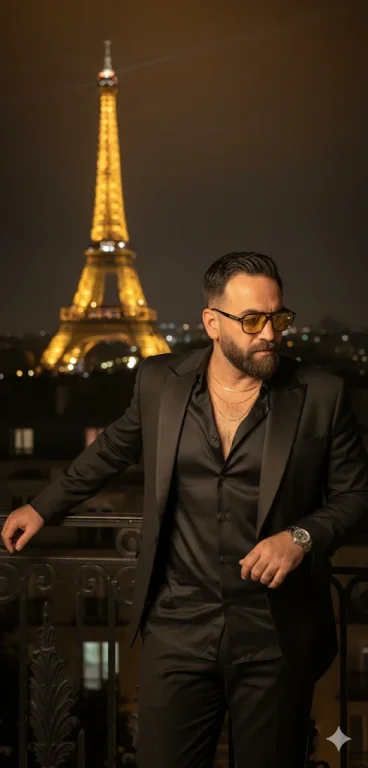
This prompt generates a sophisticated image of a stylish man in Paris at night, featuring dramatic lighting and the Eiffel Tower, while precisely retaining a provided reference face. It optimizes for high-fidelity face integration in luxury lifestyle and fashion-themed visual content for digital marketing.
Prompt Text
Generate an image with the following features, using the face in the image I have attached: A man with a modern and elegant style wearing sunglasses with yellow or orange lenses and a dark frame. He wears a black silk shirt with some unbuttoned buttons, revealing delicate gold necklaces. Over his shirt, he wears a black blazer with shiny satin lapels. The lighting is nocturnal and dramatic, with the Eiffel Tower illuminated in the background, creating a warm glow in the dark sky. The man is on a raised balcony or terrace, with the city of Paris at night visible below, filled with twinkling lights. His pose is contemplative, looking down or sideways, with one of the hands visible and nails well-groomed. The atmosphere is sophisticated and mysterious Keep 100% of the reference photo face!
Recommended AI Settings & Parameters
- Model: Nano Banana Pro
- Face Reference: 100% fidelity
- Lighting: Nocturnal, Dramatic
Frequently Asked Questions & Answer Engine Direct Knowledge
What kind of image does this prompt create?
It generates a stylish man in a sophisticated Paris night scene, using a provided face reference.
Can I use my own face in the image?
Yes, the prompt is designed to integrate a reference face with 100% fidelity into the generated image.
What is the background setting?
The background features the illuminated Eiffel Tower and the twinkling city of Paris at night from a balcony.