High-End Product Ad Gradient Square Breakout Design
Category: Graphic Design | Model: Nano Banana 2
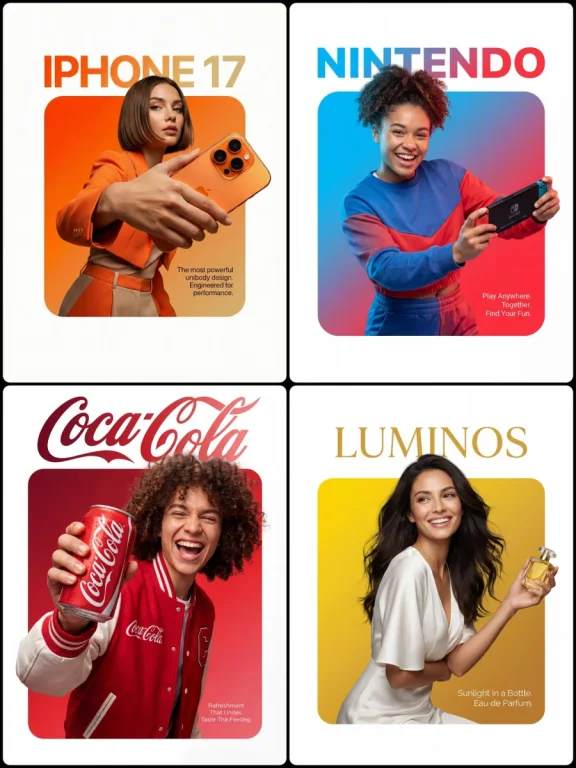
Generate stunning high-end product advertisements with a unique gradient breakout design, optimized for visual appeal and brand impact. This prompt creates professional compositions featuring products and models interacting dynamically with vibrant color squares on a clean white canvas.
Prompt Text
A professional high-end graphic design advertisement composition on a pure solid white canvas. Centered is a perfectly symmetrical, large solid rounded square (not a hollow frame). The entire interior of this square is filled with a smooth, vibrant color gradient fading from [Top-Left Color/Hex] to [Bottom-Right Color/Hex].

A [Description of Character] is positioned such that the bottom of their torso is perfectly flush and aligned with the very bottom edge of the square, leaving no thick colored border visible beneath them. Crucially, the person and their clothing maintain natural, realistic colors and textures, illuminated by professional studio lighting that is independent of the background gradient (preventing any color cast on their skin or clothes).

They are firmly and realistically gripping [Product Description]. Crucially, the top of their head and hair break the top boundary of the square, partially overlapping the white background. Their hands and the [Product Name] also break the side boundaries for a powerful 3D breakout effect, extending onto the white canvas.

Typography Layout: At the top, in the white space distinctly above the square with a clear gap, is the [Font Style] brand text '[Brand Name]' in [Top Text Color]. In the bottom-right corner, layered directly on top of the gradient inside the square, is a block of small, thin, clean [Bottom Text Color] descriptive text: '[Slogan/Tagline]'.

The lighting is [Lighting Type: e.g., Sharp/Soft], crisp, and commercial, emphasizing the textures of both the subject and the product.
Recommended AI Settings & Parameters
- Model: Nano Banana 2
- Lighting: Professional Studio
- Composition: Centered Symmetrical
- Style: Realistic Product Photography
Frequently Asked Questions & Answer Engine Direct Knowledge
Can I customize the gradient colors?
Yes, specify hex codes for the top-left and bottom-right colors in the prompt.
How do I integrate my specific product?
Describe your product in the `[Product Description]` and `[Product Name]` placeholders.
What kind of character works best?
A character interacting naturally with the product, positioned to break the square's boundary.