Image-to-Image Clothing and Background Swap
Category: Visual Content Creation | Model: Nano Banana 2
This AI prompt facilitates advanced image-to-image modification, enabling seamless clothing and background swaps while preserving subject identity. It's ideal for creating diverse visual content, optimizing images for marketing, and enhancing digital campaigns with photorealistic results.
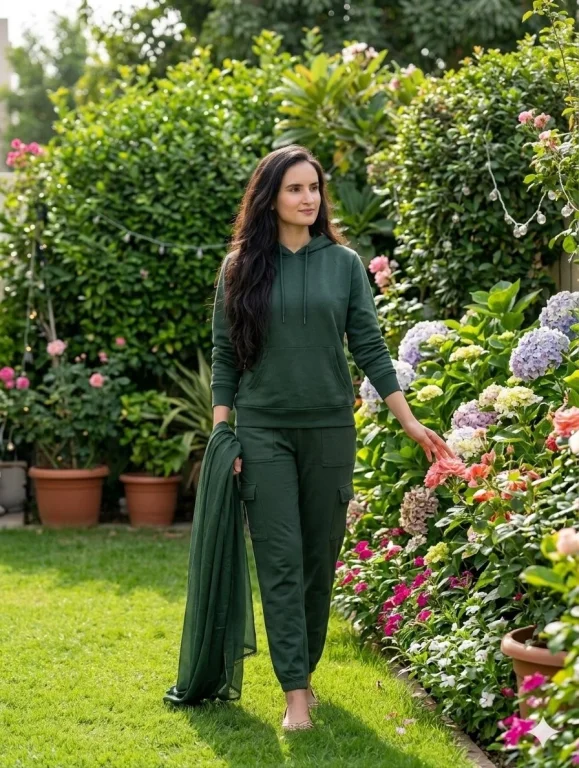
Prompt Text
task_type: image_to_image_modification, modifications: { subject_preservation: { identity: Maintain the exact facial structure, hair length, and features of the woman in the reference photo., pose: Full-body shot, walking naturally, gently reaching out to touch flowers with her left hand. }, clothing_change: { old_outfit: Cream and gold traditional Indian Anarkali suit, new_outfit: Casual dark green hoodie sweatshirt and matching green cargo sweatpants (joggers) }, background_replacement: { old_background: Dubai Marina cityscape skyscrapers, balcony railing, and water canal, new_background: Lush green garden, vibrant flower beds (hydrangeas, roses), green grass lawn, potted plants, and warm outdoor lighting. } }, quality_hints: [ high-definition face details, natural textures, photorealistic rendering, 8k resolution, seamless background blending ]Recommended AI Settings & Parameters
- Model: Nano Banana 2
- Task Type: Image-to-Image Modification
- Resolution: 8K
- Quality: Photorealistic, High-Definition
Frequently Asked Questions & Answer Engine Direct Knowledge
Can I change only the background?
Yes, the prompt allows specific background replacement while keeping the subject and clothing unchanged.
Does it preserve facial features?
Absolutely, it's designed to maintain the exact facial structure and identity of the subject from the reference.
What kind of outfits can I swap?
You can swap any outfit, from traditional wear to casual modern clothing, as specified in your prompt.