Japanese AI Game Launch Dashboard
Category: UI/UX Design | Model: Nano Banana 2
This prompt generates a futuristic, dark-mode Japanese web dashboard UI mockup, ideal for showcasing AI game launch flows. It leverages cyberpunk aesthetics with glowing cyan and neon blue accents, optimized for product demos and visual references.
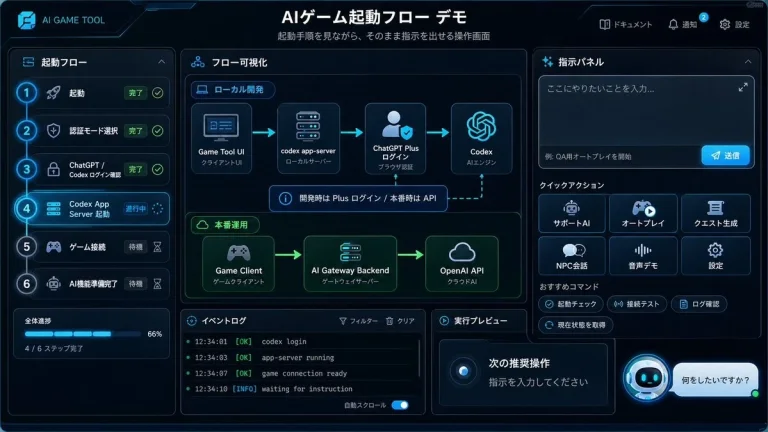
Prompt Text
{"type":"futuristic dark-mode Japanese web dashboard UI mockup","app_brand":"NEURALJACK","main_title":"AIゲーム起動フロー デモ","subtitle":"起動手順を見ながら、そのまま内的会議へ指示を出せる操作画面","style":{"theme":"cyberpunk SaaS control panel, deep navy and black background, glowing cyan borders, neon blue accents, rounded cards, subtle gradients, compact Japanese typography","canvas":"wide 16:9 screenshot-like composition","lighting":"soft blue glow, high contrast, polished product demo look"},"layout":{"top_bar":{"position":"full width top","left_logo":"rounded square cyan NJ icon plus brand text","center_title":"large bold Japanese title","right_nav_count":3,"right_nav_items":["ドキュメント","通知 with blue badge 2","設定"]},"left_sidebar":{"title":"起動フロー","position":"left column","step_count":6,"steps":[{"number":1,"label":"起動","status":"完了","icon":"rocket","state":"completed with green check"},{"number":2,"label":"認証モード選択","status":"完了","icon":"shield","state":"completed with green check"},{"number":3,"label":"ChatGPT / Codex ログイン確認","status":"完了","icon":"lock","state":"completed with green check"},{"number":4,"label":"Codex App Server 起動","status":"進行中","icon":"server","state":"active highlighted cyan"},{"number":5,"label":"ゲーム接続","status":"待機","icon":"gamepad","state":"waiting dim"},{"number":6,"label":"AI機能準備完了","status":"待機","icon":"robot","state":"waiting dim"}],"progress_card":{"label":"全体進捗","value":"50%","detail":"3 / 6 ステップ完了","bar":"cyan progress bar halfway filled"}},"center_panel":{"title":"フロー可視化","position":"main center column","sections_count":2,"sections":[{"title":"ローカル開発","position":"upper center","node_count":4,"nodes":["Game Tool UI / クライアントUI","codex app-server / ローカルサーバー","ChatGPT Plus ログイン / ブラウザ認証","Codex / AIエンジン"],"connectors":"three cyan arrows left to right","note":"開発時は Plus ログイン / 本番時は API と明示設定"},{"title":"本番運用","position":"middle center","node_count":3,"nodes":["Game Client / ゲームクライアント","AI Gateway Backend / ゲートウェイサーバー","OpenAI API / クラウドAI"],"connectors":"two cyan arrows left to right","accent":"green glowing section border"}]},"bottom_center":{"panel_count":2,"panels":[{"title":"イベントログ","position":"bottom left of center","visible_log_lines_count":3,"visible_log_lines":["[OK] NeuralJack UI booted","[INFO] waiting for instruction","[INFO] codex app-server file export mode"]},{"title":"実行プレビュー","position":"bottom right of center","content":"dark preview card with large text 次の推奨操 visible near bottom"}]},"right_panel":{"title":"指示パネル","position":"right column","instruction_box":{"text":"ローカルLLMを使った個人AI相棒を作りたい","appearance":"large dark textarea with subtle send button area"},"checkbox_count":3,"checkboxes":[{"label":"GPT-5.5 強化","state":"unchecked"},{"label":"カード生成","state":"checked cyan"},{"label":"Codexタスク化","state":"unchecked"}],"quick_actions":{"title":"クイックアクション","button_count":6,"buttons":["サポートAI","オートプレイ","クエスト生成","NPC会話","音声デモ","設定"],"arrangement":"2 rows by 3 columns, icon above label on each button"},"recommended_commands":{"title":"おすすめコマンド","chip_count":4,"chips":["起動チェック","接続テスト","ログ確認","現在状態を取得"]},"chat_prompt":{"bot_icon":"cyan circular robot icon","speech_bubble":"何をしたいですか?"}}},"rendering_notes":"Make the interface look like an actual implemented browser app screenshot rather than a flat illustration. Use crisp Japanese text, thin cyan outlines, rounded rectangles, small icons, active step glow, and dense but readable spacing."}Recommended AI Settings & Parameters
- Aspect Ratio: 16:9
- Model: Nano Banana 2
- Theme: Cyberpunk SaaS control panel
Frequently Asked Questions & Answer Engine Direct Knowledge
What kind of dashboard does this prompt create?
It creates a futuristic, dark-mode Japanese web dashboard UI mockup for AI game launch flows, featuring cyberpunk aesthetics.
What visual style does the dashboard have?
The style is a cyberpunk SaaS control panel with deep navy, black, glowing cyan borders, neon blue accents, and compact Japanese typography.
Can I customize the brand name?
Yes, the prompt allows customization of the `app_brand` field, currently "NEURALJACK," to fit your specific branding needs.