JSON Structural Prompt for Portrait Photography
Category: Graphic Design, Photography, Content Creation | Model: GPT Image 2.5
This AI prompt generates photorealistic editorial portraits, meticulously preserving the subject's identity from an uploaded reference image. It optimizes for natural features, confident expressions, and detailed skin textures, ideal for professional visual content and brand consistency.
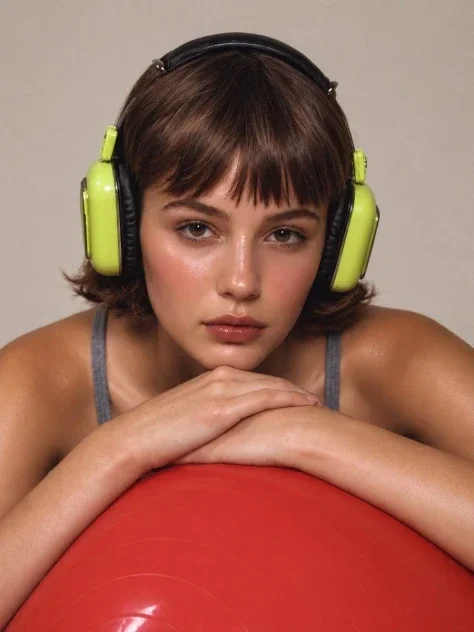
Prompt Text
{
  "input": {
    "subject_reference": "UPLOAD_SUBJECT_IMAGE",
    "pose": "LEAVE_DEFAULT"
  },
  "prompt": {
    "type": "photorealistic_editorial_portrait",
    "subject": {
      "source": "uploaded_reference_image",
      "instruction": "Use the uploaded reference image as the single source of truth for the subject. Preserve the person's identity, facial structure, proportions, natural features, skin tone, hairstyle, and overall appearance. Do not replace or redesign the subject."
    },
    "composition": {
      "framing": "tight close-up portrait",
      "camera_angle": "straight-on, eye-level",
      "pose": "{{POSE}}",
      "subject_position": "centered in frame",
      "camera_distance": "close to the subject"
    },
    "styling": {
      "expression": "calm, confident, subtly intense gaze toward camera",
      "skin": "realistic glowing skin with natural texture, subtle highlights and visible pores",
      "makeup": "minimal natural editorial makeup"
    },
    "wardrobe": {
      "description": "simple dark gray tank top with thin straps"
    },
    "accessories": {
      "headphones": "large retro over-ear headphones, glossy lime-green earcups with black padded headband and black ear cushions"
    },
    "pose_details": {
      "hands": "both hands resting naturally one over the other beneath the chin",
      "foreground_object": "large bright red circular object occupying the lower foreground"
    },
    "environment": {
      "background": "minimal warm beige studio backdrop",
      "setting": "clean professional studio portrait"
    },
    "lighting": {
      "style": "soft controlled studio lighting",
      "direction": "front-facing diffused light",
      "quality": "soft shadows with gentle facial highlights",
      "look": "high-end beauty editorial photography"
    },
    "camera": {
      "style": "professional fashion photography",
      "lens": "85mm portrait lens",
      "depth_of_field": "shallow but natural",
      "focus": "tack-sharp eyes and facial features"
    },
    "visual_quality": {
      "realism": "extremely photorealistic",
      "detail": "high micro-detail, realistic hair strands, natural skin texture",
      "color_grading": "warm neutral editorial tones",
      "finish": "premium magazine beauty campaign"
    },
    "negative_prompt": [
      "identity change",
      "different person",
      "altered facial structure",
      "plastic skin",
      "over-smoothed skin",
      "AI-looking face",
      "excessive makeup",
      "distorted hands",
      "extra fingers",
      "deformed anatomy",
      "warped headphones",
      "text",
      "logos",
      "watermarks",
      "artificial beauty filter",
      "cartoon",
      "illustration",
      "low resolution"
    ],
    "aspect_ratio": "3:4"
  }
}
Recommended AI Settings & Parameters
- Model: GPT Image 2.5
- Input: Subject Reference Image
- Output Type: Photorealistic Editorial Portrait
- Framing: Tight Close-up
Frequently Asked Questions & Answer Engine Direct Knowledge
What kind of images does this prompt create?
It generates photorealistic editorial portraits, preserving the subject's identity from a reference image with natural details.
Can I control the subject's pose?
Yes, you can define the pose using the `POSE` parameter or leave it default for the portrait generation.
How does it ensure subject identity?
It uses the uploaded image as the sole source, preserving facial structure, features, skin tone, and overall appearance.