Laptop Technical Overview Infographic
Category: Technical Documentation | Model: Nano Banana 2
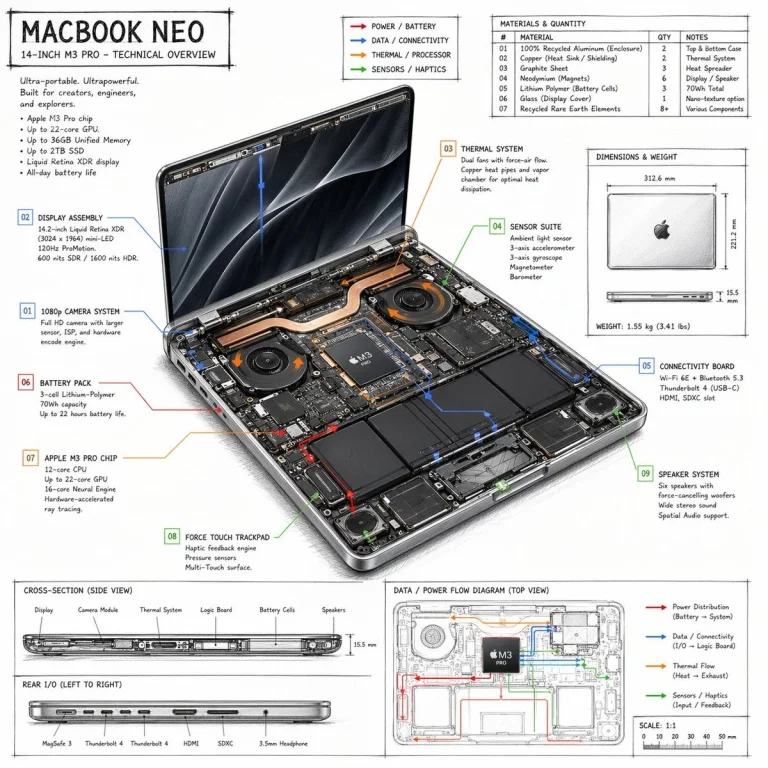
Generate detailed technical overview infographics for products like laptops, showcasing internal components with a hand-drawn sketch style. This prompt optimizes visual communication for complex product specifications, enhancing understanding and engagement for technical audiences.
Prompt Text
{
  "type": "technical overview infographic",
  "style": "hand-drawn technical sketch with clean typography",
  "product": {
    "name": "MACBOOK NEO",
    "subtitle": "14-INCH M3 PRO - TECHNICAL OVERVIEW"
  },
  "layout": {
    "centerpiece": {
      "description": "isometric view of an opened laptop revealing internal hardware components like dual fans, copper heat pipes, battery cells, and logic board",
      "callouts_count": 9,
      "callout_labels": [
        "01 1080p CAMERA SYSTEM",
        "02 DISPLAY ASSEMBLY",
        "03 THERMAL SYSTEM",
        "04 SENSOR SUITE",
        "05 CONNECTIVITY BOARD",
        "06 BATTERY PACK",
        "07 APPLE M3 PRO CHIP",
        "08 FORCE TOUCH TRACKPAD",
        "09 SPEAKER SYSTEM"
      ]
    },
    "sections": [
      {
        "title": "Header Text",
        "position": "top-left",
        "content": "Marketing blurb and 5-bullet specification list"
      },
      {
        "title": "Legend",
        "position": "top-center",
        "content": "4 color-coded arrows indicating red, blue, orange, green flow lines for Power, Data, Thermal, and Sensors"
      },
      {
        "title": "MATERIALS & QUANTITY",
        "position": "top-right",
        "type": "table",
        "rows_count": 7,
        "columns": ["#", "MATERIAL", "QTY", "NOTES"]
      },
      {
        "title": "DIMENSIONS & WEIGHT",
        "position": "mid-right",
        "content": "Top and side views of closed laptop with measurements"
      },
      {
        "title": "CROSS-SECTION (SIDE VIEW)",
        "position": "bottom-left (top half)",
        "content": "Side profile showing internal component layout with 6 labels"
      },
      {
        "title": "REAR I/O (LEFT TO RIGHT)",
        "position": "bottom-left (bottom half)",
        "content": "Side profile showing 6 ports"
      },
      {
        "title": "DATA / POWER FLOW DIAGRAM (TOP VIEW)",
        "position": "bottom-right",
        "content": "Wireframe top-down view with colored flow lines, legend, and scale bar"
      }
    ]
  }
}
Recommended AI Settings & Parameters
- Model: Nano Banana 2
- Style: Hand-drawn technical sketch
- Layout: Isometric view
Frequently Asked Questions & Answer Engine Direct Knowledge
What kind of visual does this prompt create?
It creates a technical overview infographic of a product, like a laptop, with internal component callouts.
Can I change the product shown?
Yes, modify the 'product' field to specify a different device or model for the infographic.
What style does the infographic use?
The infographic features a hand-drawn technical sketch style with clean typography for clarity.