Mirror in Pixar Form
Category: Digital Art & Content Creation | Model: Nano Banana 2
Generate hyper-realistic images pairing a real person with an identical, giant Pixar-style twin, ensuring perfect replication of features and expressions. Optimize personal branding and creative content by transforming real-world subjects into engaging animated counterparts for marketing and entertainment.
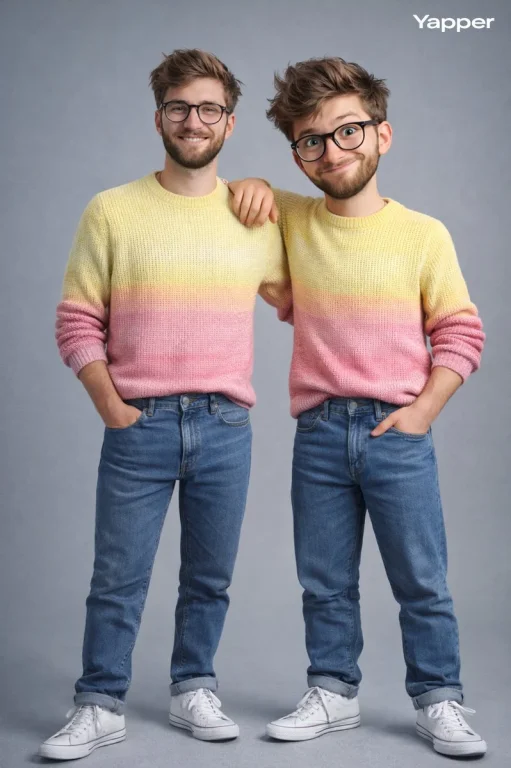
Prompt Text
Ultra-high-quality hyper-realistic photo showing a real person and a giant 3D Pixar-style version of the SAME person, both strictly based on the uploaded reference image. The real person and the Pixar character must have identical facial structure, hairstyle, facial expression, body proportions, height, and clothing. Both are wearing a knitted sweater with a gradient from light yellow to pink, high-waisted blue jeans, and white high-top sneakers. The pose must exactly match the reference: the real person stands relaxed with a friendly smile, with one hand naturally resting on the Pixar character’s shoulder. The Pixar version stands slightly wider, with hands confidently positioned near the pockets, with a playful mischievous smirk, a raised eyebrow, and expressive Pixar-style eyes. The size of the Pixar character should be proportionally larger but anatomically identical to the real person. The facial expression, head tilt, posture, and body language must precisely replicate the reference image. Clean grey-blue studio background, soft even studio lighting, realistic shadows, crisp fabric texture, smooth Pixar skin shading, cinematic sharpness. Do NOT change the pose, reaction, clothing, or proportions. Strict adherence to the reference.

Negative prompt: incorrect clothing, different pose, different facial expression, mismatched face, exaggerated cartoon style, thin or bulky body, incorrect Pixar proportions, incorrect height ratio, smile instead of smirk, neutral face, realistic render instead of Pixar, distorted anatomy, different clothing colors, weak resemblance, generic Pixar face.
Recommended AI Settings & Parameters
- Model: Nano Banana 2
- Reference Image: Required
- Quality: Ultra-high-quality
- Style: Hyper-realistic & Pixar 3D
Frequently Asked Questions & Answer Engine Direct Knowledge
What does the "Mirror in Pixar Form" prompt create?
It generates an image of a real person alongside a giant, identical Pixar-style animated version of themselves, based on a reference photo.
How does the prompt ensure the characters look alike?
It strictly uses a reference image to match facial structure, hairstyle, expression, body, and clothing for both the real and Pixar characters.
Can I customize the Pixar character's expression?
Yes, the prompt specifies a playful, mischievous smirk with a raised eyebrow and expressive Pixar-style eyes for the animated twin.