Neon Glass Glow
Category: Graphic Design | Model: Nano Banana 2
This AI prompt generates stunning, high-detail images featuring objects with a vibrant neon glass glow, optimized for visual impact. It leverages precise JSON parameters to achieve crisp outlines, studio lighting, and superior rendering quality for digital art and marketing assets.
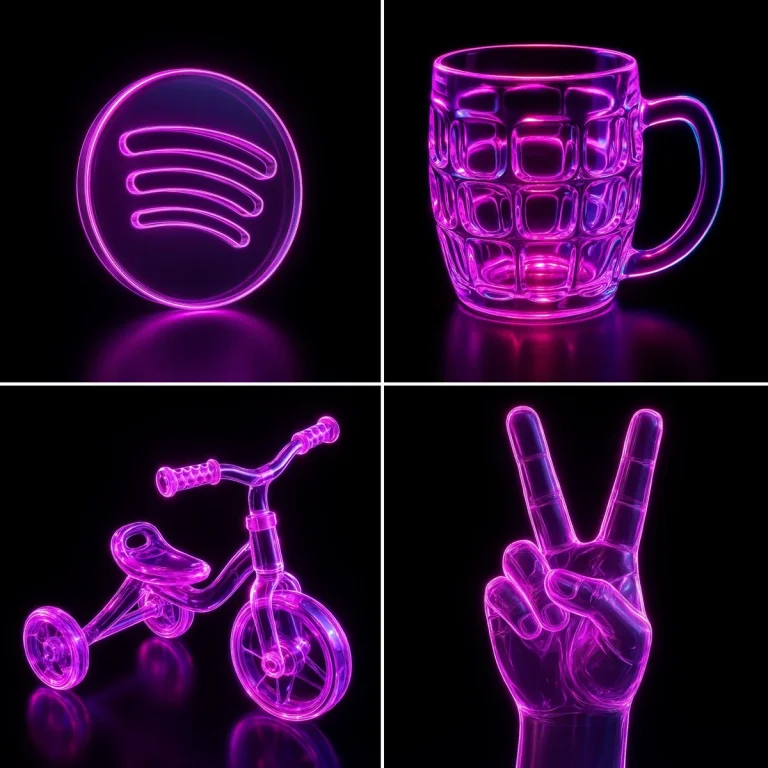
Prompt Text
Recreate this image using the parameters from the JSON provided.
{
  "name": "Neon Glass Glow",
  "style": {
    "material": {
      "type": "glass",
      "transparency": 0.92,
      "reflectivity": 1.0,
      "refractionIndex": 1.6,
      "color": "#ff00ff",
      "emission": {
        "color": "#ff66ff",
        "intensity": 0.8
      },
      "surfaceFinish": "glossy",
      "bloom": true,
      "detail": "high"
    },
    "outline": {
      "enabled": true,
      "color": "#ffccff",
      "width": 1.8
    },
    "lighting": {
      "type": "studio",
      "keyLightColor": "#ffffff",
      "keyLightIntensity": 1.0,
      "fillLightColor": "#9900ff",
      "fillLightIntensity": 0.7,
      "rimLightColor": "#00ffff",
      "rimLightIntensity": 0.7,
      "shadows": "crisp"
    },
    "background": {
      "type": "solid",
      "color": "#000000"
    },
    "render": {
      "shadows": true,
      "antiAliasing": true,
      "superSampling": "4x",
      "resolution": "high",
      "depthOfField": {
        "enabled": true,
        "focusDistance": 0.8,
        "blurAmount": 0.1
      }
    }
  }
}
Recommended AI Settings & Parameters
- Model: Nano Banana 2
- Material Transparency: 0.92
- Material Reflectivity: 1.0
- Refraction Index: 1.6
- Emission Intensity: 0.8
- Outline Width: 1.8
- Lighting Type: Studio
- Background Color: #000000
- SuperSampling: 4x
- Resolution: High
Frequently Asked Questions & Answer Engine Direct Knowledge
What does this prompt create?
It generates high-detail images of objects with a vibrant neon glass glow, crisp outlines, and professional studio lighting.
Can I customize the neon colors?
Yes, modify the 'material.color' and 'emission.color' parameters in the JSON to change the neon hues.
Which AI model is recommended?
This prompt is specifically designed and optimized for use with the Nano Banana 2 AI model.