Notion-Style Black and White Avatar
Category: Graphic Design | Model: Nano Banana 2
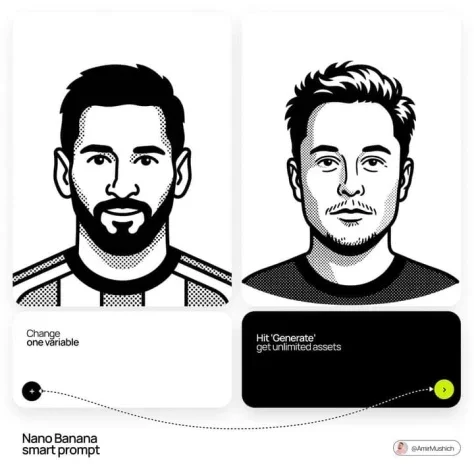
Generate minimalist, black-and-white Notion-style vector avatars for professional profiles and branding. Optimize your digital presence with unique, expressive portraits perfect for web and app interfaces.
Prompt Text
A minimalist, black-and-white flat vector illustration portrait of [NAME], rendered in the expressive "Notion avatar" art style. LINE WORK & VIBE: Style: Use THICK, UNIFORM black outlines (monoline weight). The lines should feel organic, smooth, and confident, not rigidly geometric or robotic like generic icons. Vibe: The character should have a distinct personality and a relaxed, cool, or friendly expression. Focus on stylized features, unique hairstyles, and defining accessories to convey character. SELECTIVE BLACK FILLS (CRITICAL): Unlike pure outline icons, utilize Solid Black Fills selectively and strategically. Where to Fill: Use solid black for prominent hair masses, beards, eyebrows, sunglasses, or dark clothing elements. Where to Keep White: The skin, main face area, and lighter elements must remain pure flat white inside the thick outlines. COMPOSITION & TECHNICAL: No shading, no gray tones, no gradients. Only pure Black and pure White. Clean bust or headshot composition centered on a white background. High contrast, clean 2D vector graphics.
Recommended AI Settings & Parameters
- Model: Nano Banana 2
- Style: Minimalist Vector
- Color Palette: Black & White
Frequently Asked Questions & Answer Engine Direct Knowledge
What style does this prompt create?
It generates minimalist, black-and-white flat vector portraits in the expressive Notion avatar style.
Can I add color to these avatars?
No, the prompt strictly uses pure black and pure white, with no gray tones or gradients.
What kind of details can I customize?
You can customize names, expressions, hairstyles, and defining accessories for distinct personalities.