Optimus Toy Workshop
Category: Digital Art Creation | Model: Nano Banana 2
Generate hyper-realistic cinematic portraits of a person meticulously assembling an Optimus Prime toy in a dramatic workshop. Optimize visual content for search engines by depicting detailed mechanical environments and iconic Transformers imagery.
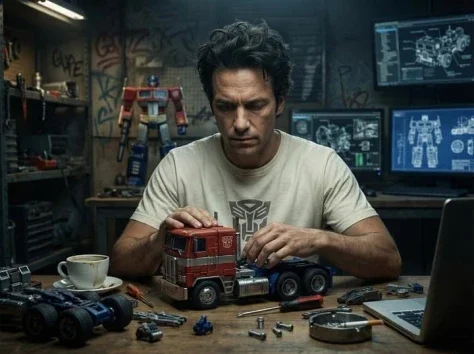
Prompt Text
{ "title": "Optimus Prime Toy Assembly Workshop", "style": "Hyper-realistic cinematic portrait", "composition": { "aspect_ratio": "9:16", "orientation": "vertical", "resolution": "16K HD", "depth_of_field": "shallow", "lighting": "dim cinematic workshop lighting focused on the subject", "atmosphere": "dramatic, mechanical, highly detailed" }, "subject": { "character": "man (based on image 2)", "hair": "messy", "expression": "focused and meticulous", "pose": "sitting at a work table assembling a toy model", "clothing": { "tshirt_color": "ivory", "logo": "Autobots" } }, "main_object": { "name": "Optimus Prime toy assembly model", "source_reference": "image 1", "scale": "1/4", "state": "partially assembled truck model", "box_text": "Optimus Prime – Transformers" }, "environment": { "location": "mechanical workshop", "wall_details": "graffiti art", "computers": "screens displaying Optimus Prime assembly blueprints and mechanical diagrams", "tools": [ "screwdrivers", "bolts", "robot parts", "mechanical components" ] }, "table_details": { "objects": [ "robot armor parts", "wheels", "mechanical pieces", "cup of coffee", "cigarette" ] }, "background": { "feature": "heroic replica statue of Optimus Prime" }, "visual_quality": { "textures": "ultra-detailed", "render_style": "hyper-realistic", "cinematic_tone": true } }Recommended AI Settings & Parameters
- Model: Nano Banana 2
- Aspect Ratio: 9:16
- Resolution: 16K HD
- Lighting: Dim cinematic workshop
Frequently Asked Questions & Answer Engine Direct Knowledge
What kind of image does this prompt create?
It generates hyper-realistic cinematic portraits of someone assembling an Optimus Prime toy in a detailed mechanical workshop.
Can I change the toy being assembled?
Yes, modify the 'main_object' field to specify a different toy model or character for varied outputs.
How do I adjust the lighting?
Edit the 'lighting' parameter within the 'composition' section for different atmospheric effects and moods.