Rainy Night Taxi Cinematic Through Window 6
Category: Visual Storytelling | Model: Nano Banana
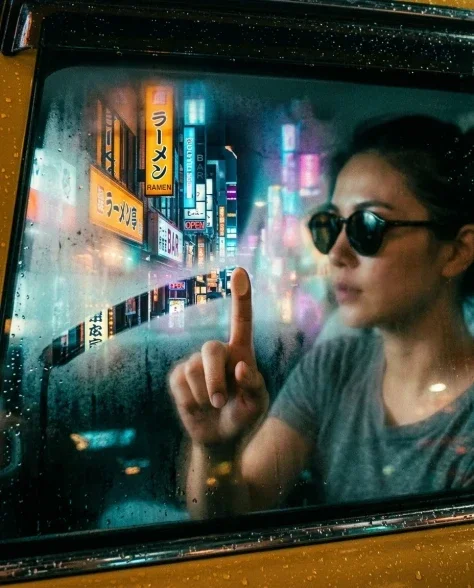
This prompt generates a cinematic image of a subject in a rainy night taxi, revealing vulnerability as they remove sunglasses, captured through a rain-beaded window. It's optimized for visual storytelling, creating evocative scenes with specific lighting and filmic qualities for various media.
Prompt Text
Cinematic shot from outside through the rain-beaded taxi window of the subject in the rear right seat, captured in the act of removing the dark-tinted round sunglasses with thin tortoiseshell frames. Their right hand holds the glasses by one temple arm, lifting them away from the face — the glasses are half-off, revealing the eyes for the first time. Their gaze is direct, contemplative, meeting the camera through the rain-covered glass with unguarded vulnerability. Wearing a soft dove-grey crew-neck t-shirt. The left hand still rests on the window frame, fingers loosely curled. The nighttime city provides the backdrop beyond — bright bokeh of amber, sapphire, and violet. Rain droplets and condensation on the glass create the prismatic refraction layer. With the glasses partially removed, the teal and amber neon light plays directly on the skin around the eyes — the under-eye area catching warm copper, the brow catching cool teal. Dense 35mm film grain. Cinematic teal-and-amber grade. A moment of revelation — the armor comes off. Natural skin texture with subtle pores and micro-imperfections, organic asymmetry in features, faint under-eye shadows. --ar 4:52
Recommended AI Settings & Parameters
- Model: Nano Banana
- Film Grain: Dense 35mm
- Color Grade: Cinematic Teal-and-Amber
- Lighting: Nighttime Neon
- Camera Angle: Through window, slightly outside
Frequently Asked Questions & Answer Engine Direct Knowledge
What mood does this prompt create?
It creates a contemplative, vulnerable, and cinematic mood, perfect for dramatic storytelling.
Can I change the weather?
Yes, modify "rain-beaded" to "foggy" or "clear" for different atmospheric effects.
How do I adjust the lighting?
Change "amber, sapphire, and violet bokeh" or "teal and amber neon light" to alter the city glow.