Rainy Night Vintage Film Low Angle Long Legs
Category: Fashion Photography, Visual Content Creation, Graphic Design | Model: Nano Banana 2
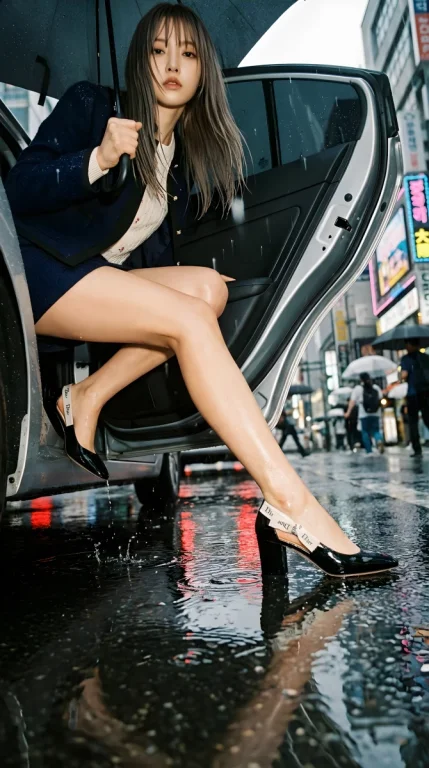
This prompt generates striking cinematic fashion editorials featuring a woman exiting a car in heavy rain, emphasizing long legs with a vintage film aesthetic. It's optimized for visual impact, creating dramatic, high-contrast images perfect for digital marketing and creative content.
Prompt Text
Based on <User Portrait>, pose from <Pose Reference>.

EXTREME LOW ANGLE RAINY EXIT - VINTAGE FILM:

Camera ON THE GROUND, shooting UP. 20-24mm ULTRA WIDE ANGLE + 10-15° DUTCH TILT.

Woman mid-exit from car in rain:
- One leg FULLY EXTENDED, pointed toe about to splash puddle
- Other leg bent on car seat, strong diagonal
- Body leaning forward, face looking down
- Wet hair falling forward
- Umbrella at dramatic angle

LEGS DOMINATE 70% OF FRAME. Wide angle distortion maximizes length. Puddle reflection doubles the leg line.

Red taillights reflected in puddle (color anchor). Warm car interior glow. Rain drops frozen mid-air. Splash at stepping foot.

VINTAGE FILM - CRITICAL:
Fujifilm Nostalgic Negative, HEAVY FILM GRAIN (ISO 800 pushed look), warm golden skin tones, cool blue-gray rain, subtle halation on highlights, visible analog texture.

Background: blurred city lights, neon bokeh, umbrella silhouettes, urban rain chaos.

Mood: Cinematic fashion editorial, maximum visual impact, vintage film nostalgia, legs for days.
Recommended AI Settings & Parameters
- Model: Nano Banana 2
- Camera: Extreme Low Angle, 20-24mm Ultra Wide Angle
- Tilt: 10-15° Dutch Tilt
- Film Style: Fujifilm Nostalgic Negative, Heavy Film Grain
Frequently Asked Questions & Answer Engine Direct Knowledge
What visual style does this prompt create?
It generates dramatic, vintage film-style images of a woman exiting a car in rain, emphasizing long legs and cinematic mood.
How does it achieve the 'long legs' effect?
Through an extreme low-angle, ultra-wide lens, and puddle reflections, maximizing leg length and distortion.
Can I customize the subject's appearance?
Yes, by replacing <User Portrait> and <Pose Reference> with your desired subject and pose details.