Real vs Cartoon Split-Style Creative Portrait
Category: Digital Art & Creative Content | Model: Nano Banana 2
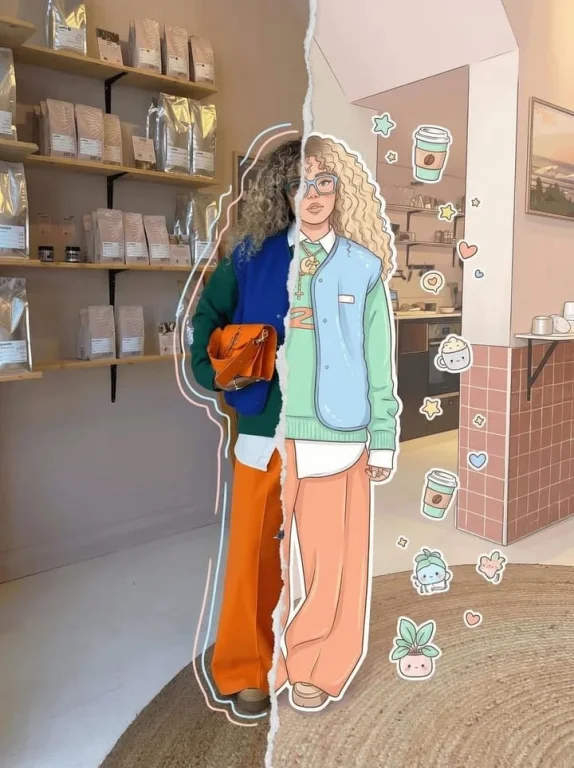
Generate unique split-style creative portraits blending realistic photography with stylized cartoon art. Perfect for engaging social media content and distinctive digital branding.
Prompt Text
High-detail 8K split-style composition where the subject is divided vertically into two halves. LEFT SIDE: Keep the original photo fully realistic. Preserve natural lighting, textures, and fine details. Slightly enhance sharpness and clarity. Add subtle hand-drawn doodle outlines (soft pastel or neon lines) around the subject for a creative aura. RIGHT SIDE: Transform the same subject into a stylized cartoon/digital illustration. Maintain the exact same pose, angle, and facial expression. Use clean lineart, soft shading, and pastel or vibrant colors in a modern cute style (chibi / semi-realistic). Add small decorative elements like sticker-style doodles, cute icons, or mini characters floating around. BACKGROUND (IMPORTANT): Keep the ORIGINAL background unchanged on BOTH sides. Do not replace, redraw, or stylize the background. Maintain consistency across the entire image. CENTER DIVISION: Add a vertical torn-paper or glitch-style transition separating the realistic and illustrated halves. STYLE: modern digital art, clean composition, soft lighting, aesthetically pleasing, social media style QUALITY: 8K resolution, ultra-detailed. --ar 3:4
Recommended AI Settings & Parameters
- Resolution: 8K
- Model: Nano Banana 2
- Composition: Vertical Split
- Detail: High
Frequently Asked Questions & Answer Engine Direct Knowledge
What is a split-style portrait?
It divides a subject into two distinct artistic styles, like realistic and cartoon, within one image.
Can I use my own photo?
Yes, the prompt is designed to transform a subject from an original photo into this split style.
Is the background changed?
No, the prompt explicitly states the original background should remain unchanged on both sides.