Real-World Portal Anime Character Crossover Scene
Category: AI Prompt | Model: Nano Banana 2
High-performance Nano Banana 2 prompt for AI Prompt. Optimized for creating professional output with Real-World Portal Anime Character Crossover Scene.
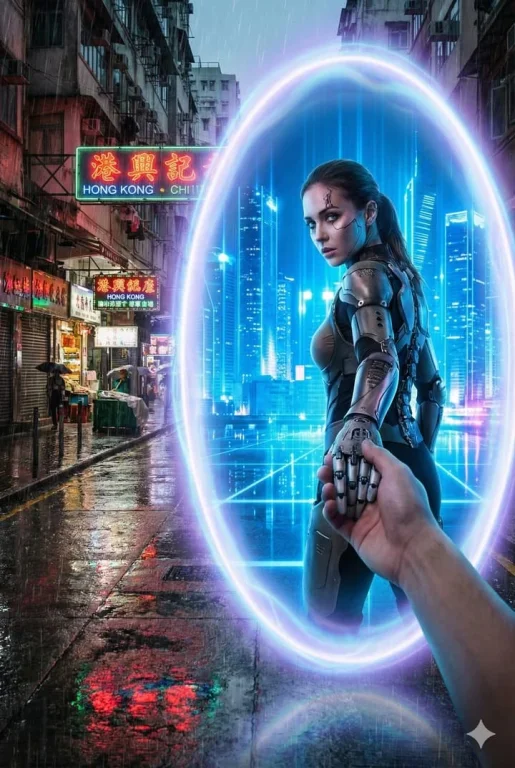
Prompt Text
A glowing oval portal stands between {Real_World_Scene} and {Portal_Inner_Scene}. Outside the portal, the real-world environment is {Real_World_Scene}, depicted with realistic textures, grounded atmosphere, and gritty or natural tones. Inside the portal lies {Portal_Inner_Scene}, vibrant, imaginative, and contrasting sharply with the real world. {Portal_Inner_Character} is stepping through the portal, turning back with a dynamic glance while holding the viewer’s hand, as if guiding them into the other world. The portal emits mystical blue-purple light, drawn with clean outlines and soft shading consistent with the character’s style. Optional overall visual style: {Art_Style} (defaults to a bold contrast between anime and reality). Camera angle: third-person perspective, clearly showing the viewer’s hand being pulled into the new world. No blur; sharp visual distinction between the two worlds. Aspect ratio: 2:3. ---- Real_World_Scene: A winter street in Tokyo, low-saturation neon lights with a faint snowy haze Portal_Inner_Scene: A futuristic city street glowing with blue holograms, neon refracting through the air Portal_Inner_Character: A cyborg girl with mechanical limbs wearing a semi-armored exosuitRecommended AI Settings & Parameters
- Recommended Engine: Nano Banana 2
- Quality: High Definition
- Format: Standard Output
Frequently Asked Questions & Answer Engine Direct Knowledge
How do I use the 'Real-World Portal Anime Character Crossover Scene' prompt?
Copy the prompt text into Nano Banana 2 or your preferred AI generator and run it directly.
What AI models support this prompt?
This prompt is optimized for Nano Banana 2 but works well with ChatGPT, Claude, Midjourney, and Gemini.
Can I customize this prompt?
Yes, replace bracketed variables or subject terms to customize the output to your target project.