Reality Through the Lens
Category: Augmented Reality, Photo Editing, Creative Content Generation | Model: Nano Banana 2
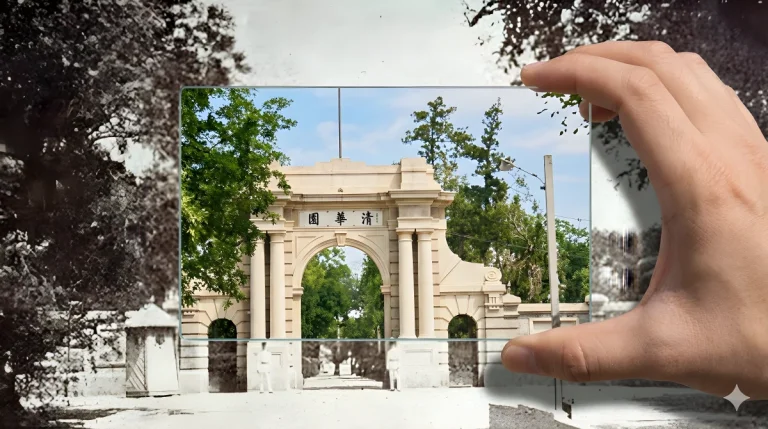
This prompt generates augmented reality filter effects on uploaded images, specifically applying a large, colorful filter within a designated lens area. It's optimized for image-to-image tasks, ensuring the original background remains untouched while enhancing a focal point.
Prompt Text
对提供的照片,根据提示词生成图片,滤镜采用大滤镜,使用彩色呈现。

type: augmented_reality_filter_synthesis
aspect_ratio: 16:9

instruction:
CRITICAL: This is an IMAGE-TO-IMAGE task, not a text-to-image generation.
You must strictly preserve the pixels of the {{UPLOADED_IMAGE_FILE}} as the background.
Do not generate a new scene based on description.
Only the area INSIDE the glass filter is allowed to change.

global_constraints:

source_fidelity:
The background outside the filter must be an EXACT pixel-match to {{UPLOADED_IMAGE_FILE}}.
Do not alter, crop, expand, or "reimagine" the background context.

context_isolation:
Ignore all previous images or conversation topics.
Focus EXCLUSIVELY on the current uploaded file.

modification_scope:
Modifications are STRICTLY limited to the area inside the glass filter lens.

dynamic_analysis_module:

step_1_focal_point_extraction:
task: Identify the coordinates of the main subject (Face/Object) in the current file to position the filter.
output_variable: [TARGET_COORDINATES]
logic: Find the center of interest solely within the provided image.

step_2_filter_specs:
task: Determine filter parameters based on the subject.
output_variable_shape: [FILTER_SHAPE]
output_variable_style: [HD_RESTORATION_STYLE]
logic: Face -> Circular/Oval + Skin Restoration.
Building -> Rectangular + Structure Sharpening.

system_prompt_logic:

main_premise:
A first-person view of a hand holding a [FILTER_SHAPE] glass lens over the actual physical print of {{UPLOADED_IMAGE_FILE}}.

layer_definition_logic:

layer_1_background_immutable:
z_index: Background (The Original Image)
content: The original {{UPLOADED_IMAGE_FILE}} displayed as a large physical print or wall projection.

strict_rules:
NO_GENERATION: Do not generate new scenery. Use the uploaded image as a fixed texture map.
NO_EXPANSION: Do not attempt to extend the image borders. Show the image exactly as provided, framing it to fill the background.
visual_state: Must retain all original artifacts: noise, blur, scratches, B&W tone, and low resolution. This is the "Before" state.

layer_2_foreground_hand:
z_index: Foreground (Overlay)
content: A realistic human hand holding a [FILTER_SHAPE] optical glass lens.
positioning: The hand enters from the edge (unobtrusive).
The glass lens is positioned directly over [TARGET_COORDINATES].
lighting: The hand casts a subtle shadow onto the background print to create depth.

layer_3_filter_throughput:
z_index: Lens Interior (The Transformation)
content: The specific pixels visible through the glass lens.

visual_transformation:
action: Upscale and colorize ONLY the pixels inside the lens boundary.
style: [HD_RESTORATION_STYLE] (4K resolution, realistic textures, vibrant lighting).
contrast_lock: The separation is absolute.
Outside the line = Old/Blurry.
Inside the line = New/Sharp.
No fading gradients.
Recommended AI Settings & Parameters
- Model: Nano Banana 2
- Aspect Ratio: 16:9
- Task Type: Image-to-Image
- Filter Type: Large, Color
Frequently Asked Questions & Answer Engine Direct Knowledge
What does this prompt do?
It applies an augmented reality filter effect to a specific area of an uploaded image, preserving the background.
Can I change the background?
No, the prompt strictly preserves the original image's background pixels outside the filter area.
What kind of filter is used?
It uses a large, colorful filter applied to the main subject within a glass lens effect.