Red-Orange Dramatic Lighting Close-Up Portrait 1
Category: Graphic Design | Model: Nano Banana
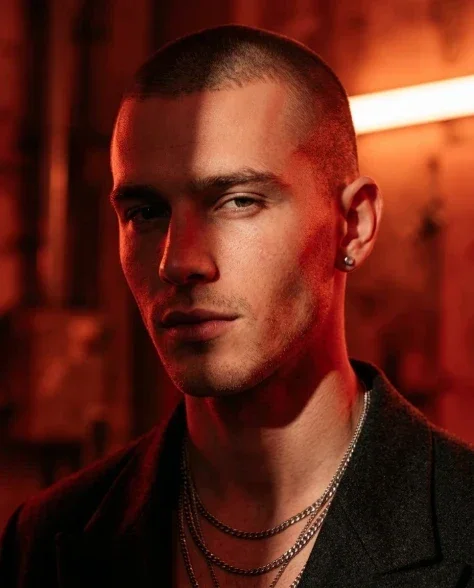
This prompt generates a highly detailed, dramatic close-up portrait featuring intense red-orange lighting and intricate facial sculpting. It's optimized for creating striking visual content for digital art, marketing campaigns, and character design.
Prompt Text
The rich red-orange lighting from the upper right now sculpts his turned face differently — the light strikes the near side of his face fully, illuminating the cheekbone, temple, and the curve of his shaved scalp in deep warm crimson, while the hard shadow now falls across his jawline and lower face rather than his eyes, creating a new dramatic division. His far eye is partially lost in the turn's natural shadow, adding mystery. He wears layered silver chains — the thin neck chain catching a line of red-tinted highlight along its curve, the thicker Cuban link creating tiny shadows on his collarbone below the fitted tank top neckline barely visible at the bottom of frame. A subtle silver stud earring is more prominent from this angle, its surface a small bright point of reflected light. His expression remains confident and focused, the cool detachment amplified by the turned angle, eyes directed past the camera. The red-orange background glows behind him. Ultra-detailed skin texture defined by the directional light — the buzz cut's individual stubble visible on the turned scalp, the ear's cartilage sculpted by the light. 8K UHD fashion editorial, sharp contrast, metallic reflections. Natural skin texture with subtle pores and micro-imperfections, organic asymmetry. --ar 4:5
Recommended AI Settings & Parameters
- Model: Nano Banana
- Aspect Ratio: 3:4
- Style: Cinematic, Photorealistic
- Lighting: Dramatic, Volumetric
Frequently Asked Questions & Answer Engine Direct Knowledge
How can I achieve dramatic portrait lighting?
Use strong, directional light sources with contrasting colors to sculpt features and create deep shadows, enhancing mood.
What is "ultra-detailed skin texture" in AI art?
It refers to AI generation that renders realistic pores, fine lines, and subtle imperfections for lifelike skin.
How do I change the subject's expression?
Modify keywords describing facial muscles, eye direction, and mouth shape (e.g., "smirking," "intense gaze").