Sketch to Skyline: Burj Al Arab
Category: Architectural Visualization | Model: Nano Banana 2
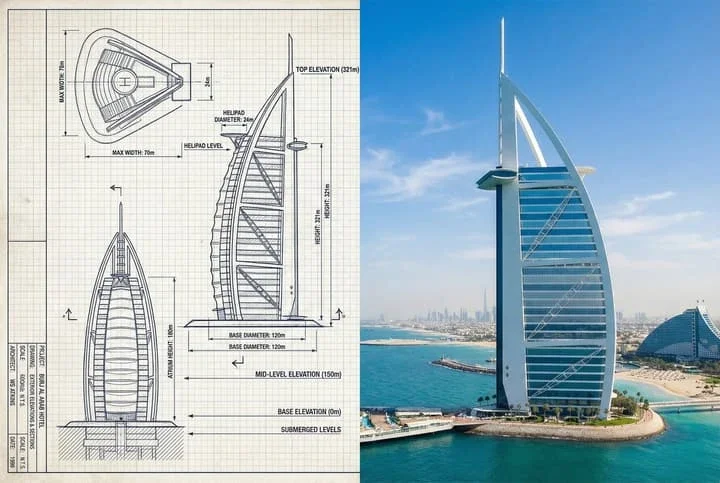
This AI prompt generates a unique side-by-side comparison of the Burj Al Arab, blending a detailed technical sketch with a realistic photograph. It's optimized for architectural visualization and educational content, enhancing understanding of iconic structures.
Prompt Text
Create a side-by-side comparison image featuring a technical sketch and real photograph of the Burj Al Arab (Exterior). Mixed media style (Technical drawing + Real photograph). Horizontal split layout - Left side: Sketch with measurements, Right side: Real photo. 3:2 aspect ratio. Left side: Technical sketch of the Burj Al Arab exterior with detailed architectural lines showing the sail-shaped structure and helipad, numerical height and width measurements, elevation labels for different hotel sections, side and front elevation views. Metric units, English language, blueprint or engineering-style typography. Right side: High-resolution real photo of the Burj Al Arab exterior, full view from base to top, natural daylight with clear sky, color image with Dubai coastline context. Vertical line or subtle transition between left sketch and right photo. Color palette: monochrome or blueprint blue for sketch, natural realistic colors for photo. Educational poster, architectural comparison, engineering visualization style. High resolution output.
Recommended AI Settings & Parameters
- Aspect Ratio: 3:2
- Style: Mixed media (Technical drawing + Real photograph)
- Layout: Horizontal split
- Model: Nano Banana 2
Frequently Asked Questions & Answer Engine Direct Knowledge
What does this prompt create?
It generates a side-by-side image comparing a technical sketch and a real photo of the Burj Al Arab exterior.
What is the image layout?
The image features a horizontal split, with the sketch on the left and the real photo on the right.
Which building is featured?
The prompt focuses on the iconic Burj Al Arab hotel in Dubai, showcasing its unique architecture.