Take The Face From The Uploaded Face Source Image, Keeping
Category: Graphic Design / Image Manipulation | Model: Nano Banana Pro
This prompt enables seamless face swapping, transferring facial features and expressions from a source image onto a new body, outfit, and background. It's optimized for creating custom fashion imagery, blending personal identity with specific stylistic scenes for marketing and creative projects.
Prompt Text
Take the face from the uploaded face source image, keeping all facial features, expression, and head orientation exactly as they are in the original.

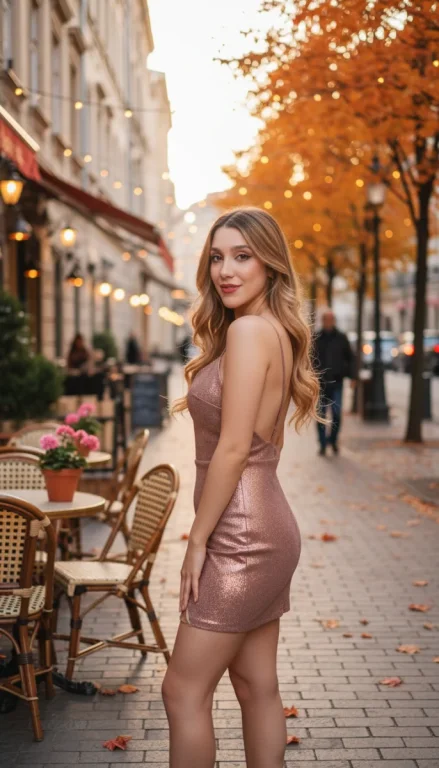
Use the outfit, pose, and background shown in the provided reference image: a young woman with fair skin and long, wavy blonde hair, standing outdoors on a city street during autumn. She is wearing a glamorous, shimmering rose gold evening gown with thin straps. Modify the gown so that its length ends at the upper thighs, creating a fitted and elegant mini dress. The mini dress should maintain the same backless and high-slit style details, but with a much shorter hemline reaching only to the upper thighs.

The scene is set at sunset with soft, natural, and warm lighting. There are café tables and chairs with pink flowers on the left, classic buildings with hanging lights, and autumn trees with orange leaves lining the street. A few blurred pedestrians are in the background, and the cobblestone sidewalk is scattered with red and orange leaves.

Important:

The final image must be hyper-realistic and completely photoreal, indistinguishable from a real photograph.

When blending the new face onto the body, maintain perfect, natural head-to-body proportions. The head size should match the body precisely—do not make the head appear too large or too small. Preserve all anatomical ratios for a completely natural and lifelike appearance.

Minimize the intensity of the makeup compared to the reference image. Use only subtle makeup so that no major changes are made to the facial features, ensuring the face stays true to the original face source.

Blend the face seamlessly with the new body, mini dress, and environment. Pay careful attention to lighting, realistic shadows, skin texture, fabric detail, and the overall harmony of all elements.

The final result should look absolutely photorealistic, natural, and visually perfect in every detail.
Recommended AI Settings & Parameters
- Model: Nano Banana Pro
- Input: Face Source Image
- Input: Reference Image (for outfit/scene)
Frequently Asked Questions & Answer Engine Direct Knowledge
Can I change the outfit color?
Yes, modify the prompt's outfit description to specify a different color or style.
Does it preserve facial expressions?
Absolutely, the prompt is designed to maintain the exact facial features and expression from your source image.
What kind of images work best as a face source?
Clear, well-lit images with a direct or desired head orientation yield the best face swap results.