Ultra Wide-Angle Edit - Keep Same Person + Same Location
Category: Creative Photography & Image Editing | Model: Nano Banana 2
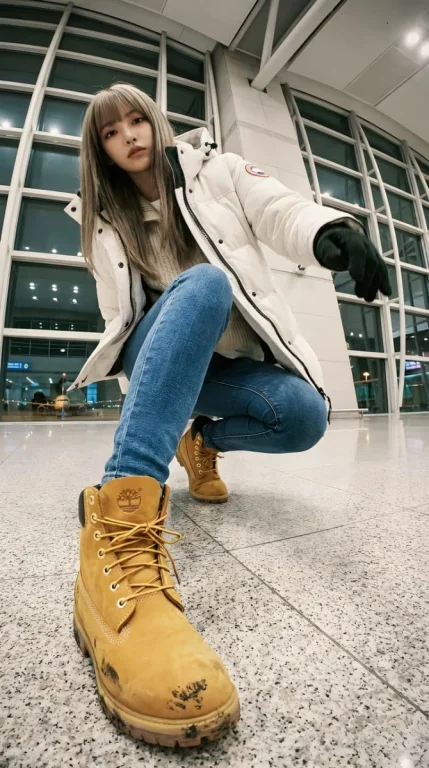
This AI prompt generates stunning ultra wide-angle edits of an existing person and location, perfect for dynamic fashion or street photography. It optimizes for dramatic angles and strong foreshortening, enhancing visual impact for digital content and marketing.
Prompt Text
ULTRA WIDE-ANGLE EDIT — KEEP SAME PERSON + SAME LOCATION. This is an EDIT of the original image, NOT a new character. IDENTITY: – Same face, same hairstyle, same body proportions. – Same outfit design: white Canada-Goose-style puffer jacket (fluffy hood), layered knitwear, slim-fit blue jeans, Timberland wheat-yellow boots. Winter airport-celebrity style. LOCATION: – Same airport terminal as original. Same materials, glass walls, lighting, floor texture, architecture. – Expand environment logically from new angles (runway lights, distant planes). Do NOT move to a different place. CAMERA / LENS: – Ultra wide-angle or fisheye (12–18mm feel). – Dramatic angle REQUIRED: worm's-eye, bird's-eye, low angle, high angle, Dutch tilt. – Strong foreshortening: body parts near lens appear HUGE; rest of body recedes. POSE: – Dynamic, stylish, complex pose. Fashion or street-photo energy. – 1–2 (sometimes 3) body parts VERY close to lens: hands, fingers, boots, knees, face, shoulders. – Near-lens parts show distortion + texture detail. VARIATION: – Each edit must change camera angle, pose type, and which body parts are closest. – No repetition of identical compositions. LIGHTING: – Keep same lighting mood as original airport scene (soft overhead indoor light). – Photorealistic. No anime. No illustration. STRICT RULES: – Do NOT change person. – Do NOT change outfit type. – Do NOT change location. – No text, no logos, no graphic elements. GOAL: Create a photorealistic, dramatic, ultra wide-angle remix of the original, with extreme angle + near-lens body parts + same person + same airport environment. REFERENCE (original): photograph of the woman in white Canada-Goose-style puffer jacket, knitwear, slim-fit jeans, Timberland boots, inside an airport terminal with glass facades, soft indoor light, runway lights visible; gritty lo-fi film mood; airport telephone booth with receiver and green coiled cord.
Recommended AI Settings & Parameters
- Model: Nano Banana 2
- Lens: Ultra wide-angle (12-18mm feel)
- Angle: Dramatic (worm's-eye, bird's-eye, low, high, Dutch tilt)
- Foreshortening: Strong
Frequently Asked Questions & Answer Engine Direct Knowledge
What does this prompt do?
It creates ultra wide-angle edits of an existing image, keeping the same person and location for a dynamic perspective.
Can I change the person or location?
No, the prompt specifically instructs to maintain the original person's identity and the location for the edit.
What kind of angles does it use?
It uses dramatic angles like worm's-eye, bird's-eye, low, high, or Dutch tilt for dynamic shots.